Binding Run-time Information to reports
There is certain run-time information like user Login Id’s or in the case of Siebel, Position ID’s that can be passed to ensure the dataset that is returned is of relevance to the particular Login or Siebel position that the user has logged on with.
This allows for the support of user-sensitive security based either on a user’s login or position and can be extended to support other architectures besides Siebel.
At any time, if a position based login is used, the value of this position is available via the «POSITION» pseudo-value and this can be included in the SQL of the query to retrieve the data.
At all times, the «LOGIN» variable relates to the user id currently logged with the established session.
If BIPLUS is being called from a particular application via a StaticReport call (explained in more detail in Callable Reports Section), then you may want to transmit the key (Siebel ROW_ID column value in Siebel) that the cursor happens to be on inside the particular application. All this is supported and very doable inside BI Plus.
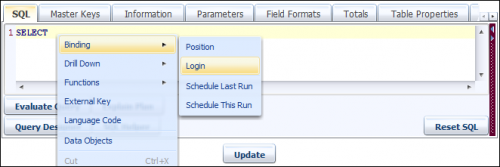
We call this process the binding of certain information, so that we do not have to enter a separate query for each report to be delivered. This is very similar to parameters, but we can get these in real-time at run-time.
So, we launch BIPLUS Developer (Admin) mode and then generate a report to create. For this particular example, we will just show the value of LOGIN, which is a runtime populated environment variable inside BIPlus.
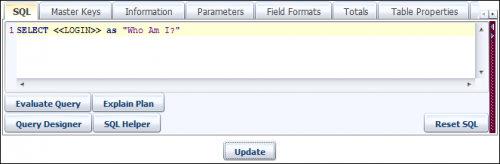
If we wanted to tie any data to this, we could just write a query like: Select some stuff where visibility rules applied for «LOGIN».

In Siebel, you can pass through the primary or current position via OpenReport and use the same concept, so that Siebel visibility rules could be applied to the dataset generated.