Broadcast Message
The Broadcasting capabilities of BIPLUS are an optional feature for each environment. Broadcasting is simply a way to let all online users see a specific series of messages, and the frequency at which to check for new broadcast messages and the speed at which to display them (n characters / second).
By default Broadcasting is disabled in green-fields environment (where nothing beyond the basic repository installation has been done). You have to manually enable it from Configuration Management dialog. See image below.

- Broadcasting: Enable broadcasting for Reporter. Broadcasting message appears in browser's status bar. Broadcast messages are set up in Administrator mode, and the message is either disabled or enabled. Broadcast message always appears only in Reporter mode.
- Message Update Interval: This takes value in minutes. After certain amount of duration it checks for updated message on server and displays it.
- Broadcasting Speed: This tag tells BIPLUS how fast to display the characters (n characters / second), takes integer as input. Most comfortable reading speeds are between 6 and 10 characters per second.
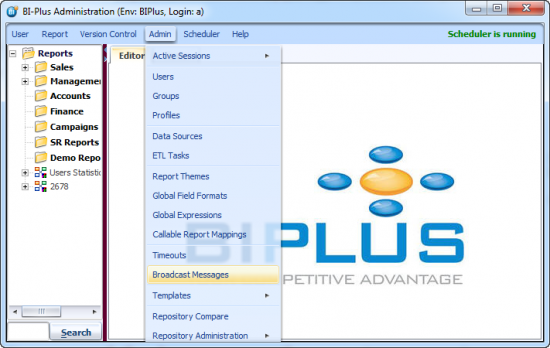
Once the broadcasting is enabled, to configure a Broadcast Message, select it from the Admin ⇒ Broadcast Message menu options.
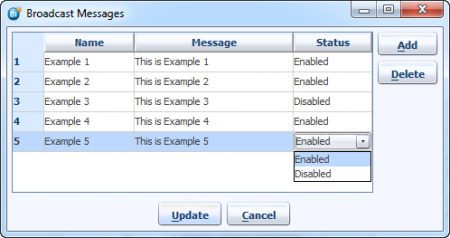
When the Broadcast Message dialog opens, you will see all the Broadcast messages defined for the system. Only those Broadcast messages marked as ‘Enabled’ will be broadcast to ALL users of the system.
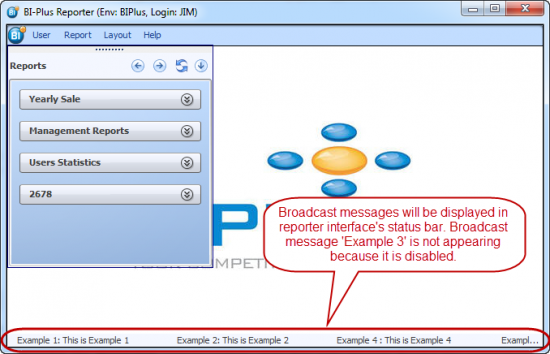
When you login into the Reporter interface, all broadcast messages will be displayed in the browser Status Bar (situated at the bottom of window). The message set will be displayed as a scrolling marquee type. See image below.