Table of Contents
Data Objects
Data Objects are the most important aspect since version 2.5 release that has set BIPLUS apart from other BI tools. BIPLUS Data Objects allow us to join data from multiple databases together. Data Objects also allow us to materialize the data from a particular query and then cache it, so as to enhance performance by avoiding the database lookup and reading directly from a cached entity.
Data Objects also facilitate the creation of multiple-pass queries and a rapid ETL process (within limits).
With Data Objects, we can use lookup tables in external data sources (spreadsheets or Access tables), join information between disparate RDBMS sources or even systems.
Simply put, each chunk of data (a dataset returned by a query) becomes a data object, and a data object is seen by BIPLUS as a virtual table, such that the tables (data objects) can be joined together to form a consolidated dataset, which can then be delivered in any of the supported formats supported by BIPLUS (tabular reports , charts, templates, PDF, XML, etc.).
Data Objects can reside either in BIPLUS’s internal database or they can reside in the repository schema in Oracle.
Data Objects in Oracle: Pro’s and Con’s
Pro's:
- Oracle Analytic SQL is supported.
- Easy hierarchical queries.
- Familiar Oracle syntax.
- Support of inline views and other Oracle-specific features.
- Larger data sets (except when repository resides on XE).
Con's:
- Slower to load, by a factor of 300% in some cases.
- Version specific Data Object DDL internally.
- Bloats repository when Oracle is on XE to XE limits.
There are 3 types of Data Objects:
- Private Data Objects – visible only to the parent report.
- Public Data Objects – visible to all reports.
- Pass-through Data Objects – resolve to an inline view in the original datasource.
The following diagram explains Private data objects in a different way.
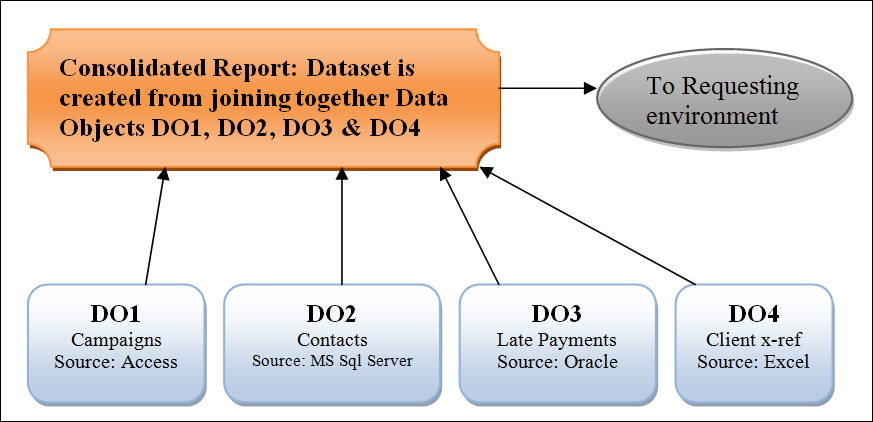
With Private Data Objects, each of the DO objects is a child of the consolidated report, and the child-type is ‘data object’. Each of the data objects is a query in its own right. DO1 is a query into the Campaigns datasource, which is stored in an MS Access datasource on the corporate network. The list of rows returned can be limited by parameterizing the query (select the campaign type or select campaigns from last 90 days, or select all inactivate campaigns (those not launched yet, where start_date > today ), etc. As a parameter list).
The Contacts database may reside on another database, like MS SQL Server. The list of contacts might be limited to those contacts where the campaign ID matches the campaign id selected in DO1, thus limiting the amount of data returned to BIPLUS. It will not make a lot of sense to send back all the contacts from the contacts database, as these could potentially be millions of records in a large environment.
The Spreadsheet could contain the list of cross-reference data between the billing system (Late Payments) and the contacts system, as the two systems could potentially reference the same contacts by different identifiers, and a cross-reference table / spreadsheet somewhere on the network, can be harnessed by BIPLUS to effectively join the data from the two disparate systems.
So let us see how we go about creating a consolidated report based on data objects
Creating the Parent report & Private Data Object reports
For this example, we will join the data from 3 different databases, ORDERS residing on MS Excel, PRODUCT SALE on Oracle and PRODUCTS on SQL Server. We will start off the top level in ORDERS (Excel) and allow a drop-down to a joined query between the PRODUCTS on SQL Server and the PRODUCT SALE on Oracle.
Start at the top level to show the ORDERS. Note the datasource is pointing to an Excel ODBC on the host machine.
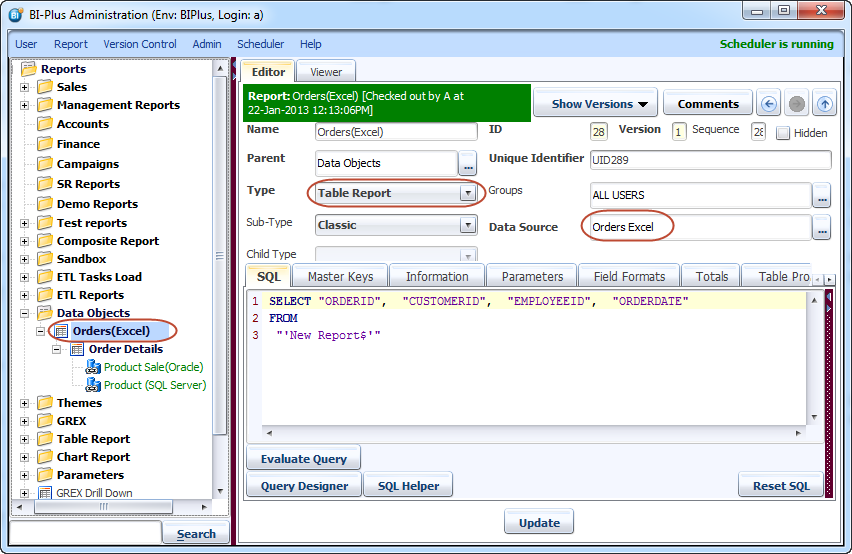
To enable the drilldown, we have configured the master key to ORDERID.

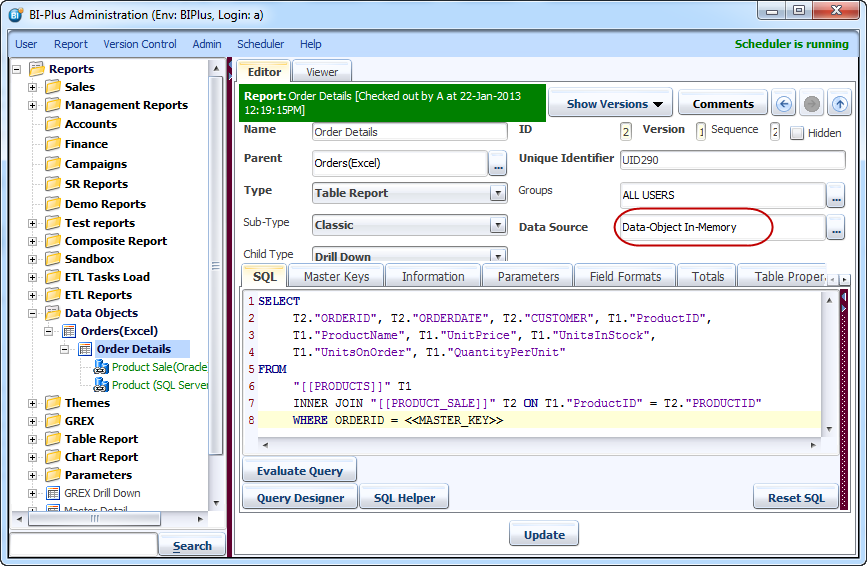
Now we create the drilldown report say Order Details which will comprise joining together the data objects. Let us leave the SQL blank for now until we have populated and tested the data objects. Select Data source Data Objects in Memory to save the report. We will explain this later in this section.

Now it is time to move on to create the first data object. We will create a data object based on a small table that will bring back all the records. In a production environment, this might not be a feasible approach (there could be several million records and the last thing to do in a production environment is forcing a real-time huge table replication every time the query is launched), thus the data object’s data should be limited / filtered. In this case, the limitation is easy, and since the data object is a private child, we could just configure the result to be based on the grandparent master key.
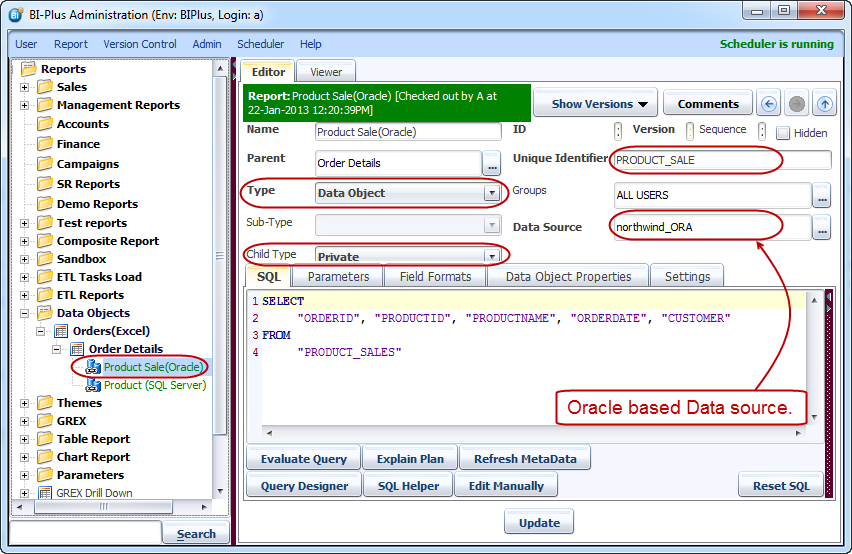
Here we have created a Data Object with child type as Private, SQL in this report is running on the Oracle data source. We have edited Unique Identifier to PRODUCT_SALE. The Data Object is referenced by its unique ID. Since this data object is a private object (Child type ='Private'), it can only be invoked by the parent report.
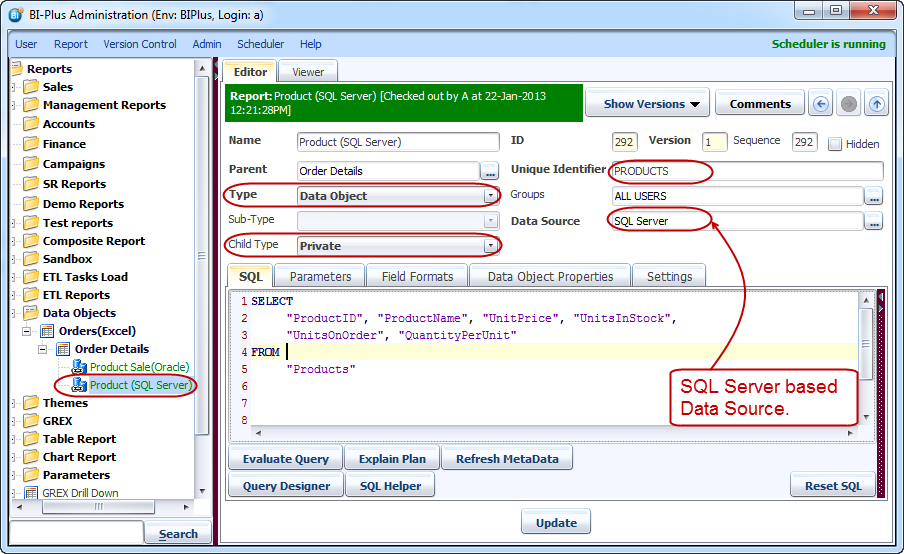
Now let us create the other data object child for Order Details. Following image shows that another Data Object called PRODUCT created which has a SQL server based data-source. Unique Identifier is edited to PRODUCT.
Now let us head back to the top level report (Order Details). Inside the SQL pane, to invoke the name of the Data Object child (to avoid typing errors, this method is advised), right click in the SQL pane and select Data Object Childs option to bring up the Data Object selector dialog.
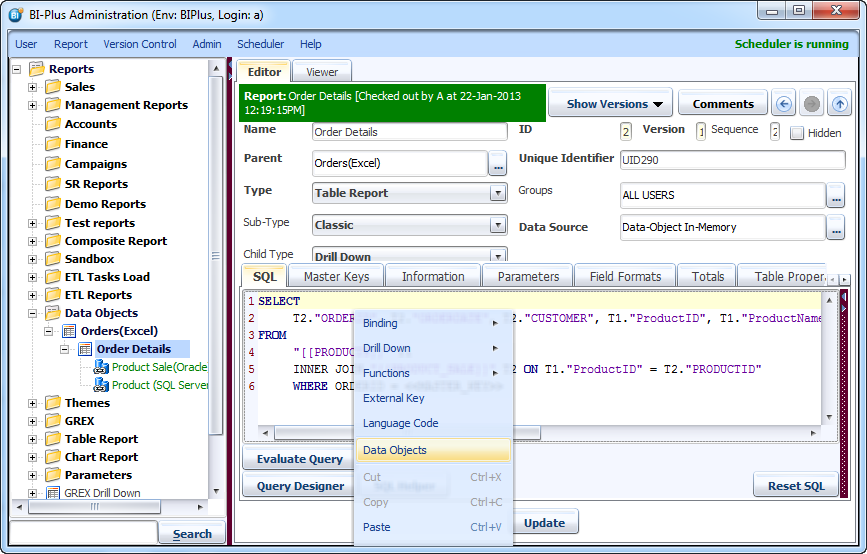
Mark both Data Objects and click on OK button and both data objects will be displayed in the SQL pane. You will notice that the Data Object names correspond with the Unique Identifier of the data object report.
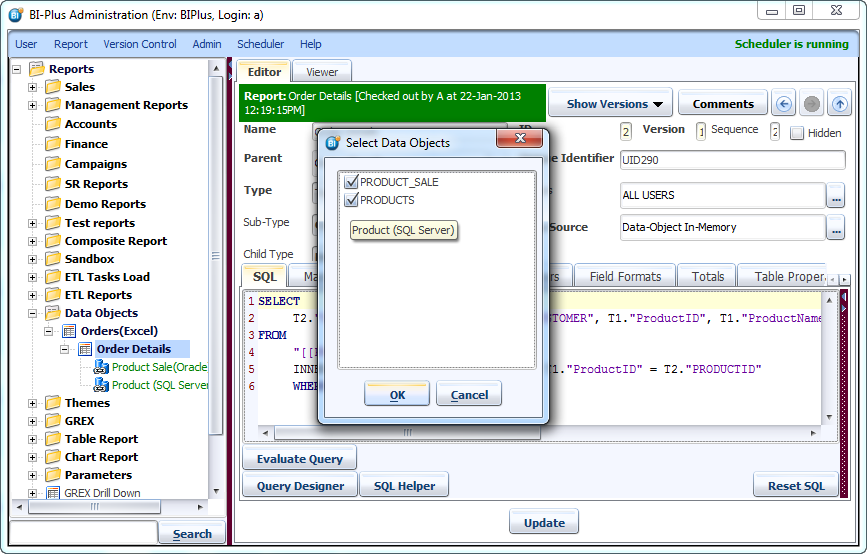
SQL of Order Details will look like this. Remember to always reference Data Objects by their UNIQUE IDENTIFIER, as these can be migrated between environments.
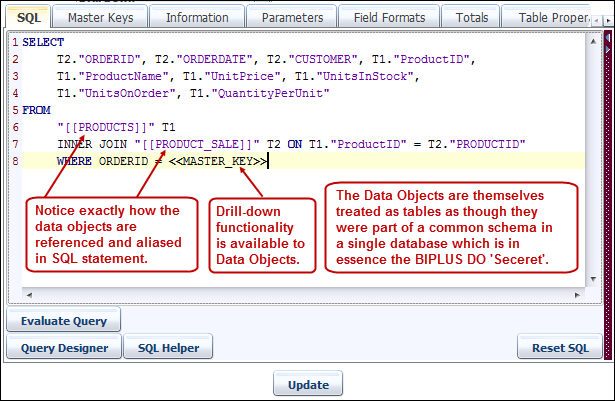
Now if you run the report Orders and drill downs on a record then you will get data for Order Details which is joined from two different data sources.
Selecting from a Data Object
To select data from a data object, the report MUST show the datasource that is allocated to Data Objects. The data source for ‘normal’ (BIPLUS resident) objects are called Data-Object In-Memory. Optionally, if the data object is to be used with advanced features that are available in Oracle (hierarchical processing invoked by ‘CONNECT BY PRIOR’ or Oracle Analytic SQL [over (partition by …) clauses], or if the table created will be so large that it may blow out the Java memory and a slower disk-Based storage solution is the answer, then BIPLUS allows the data object to be created as a temporary table in the repository schema, referenced by the logical Unique Identifier of the Data Object. Other features of Oracle that are compelling are the detailed TO_CHAR and TO_DATE functions found in Oracle-supported SQL.
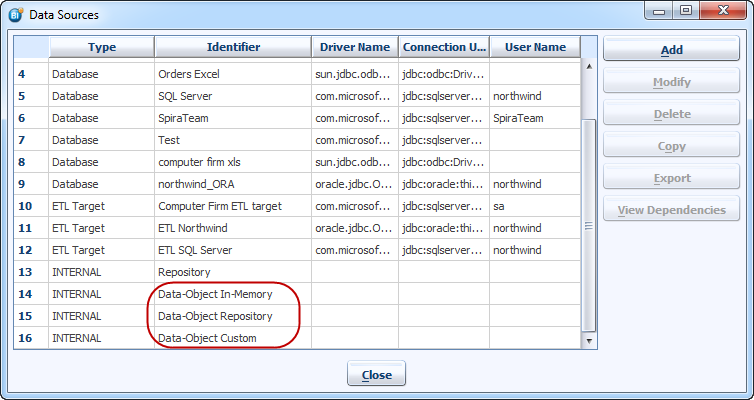
So now you might have understood that why we selected Data-Object In-Memory data source for the Order Details report.
Indexing of Data Object – Boosting Performance
After some rigorous testing, it was found that if two large data objects are joined (let us consider an ANSI-SQL style outer join), that if the joined fields were indexed, the performance of the query joining the data objects together is between 10 and 100 times faster.
To automatically configure BIPLUS to create an index on the Data Object, list the columns to be indexed, in order at the very front of the SQL statement (they should be the first columns after the SELECT key operator).
Then go to the Data Object Properties Tab and in the Index Columns drop-down box, select the number of columns on which the primary index is to be created.
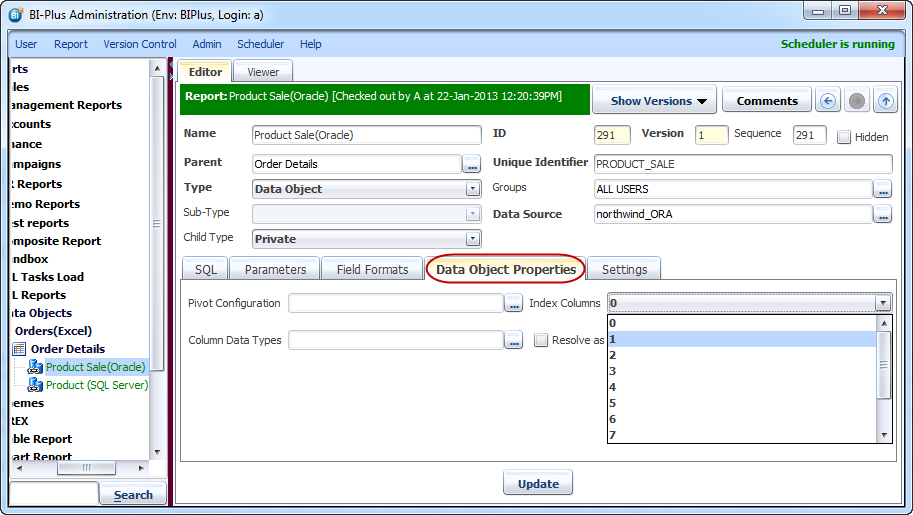
Save / Update the report and you are done. At run time, right after the data object has been created, the index to the data object will be created in memory. Note ! This index is created in BIPLUS memory structure only ! At no time is the source database or schema altered in any way ! !