====== Sorting ======
Sorting option is available in Toolbar and in Right-click menu.
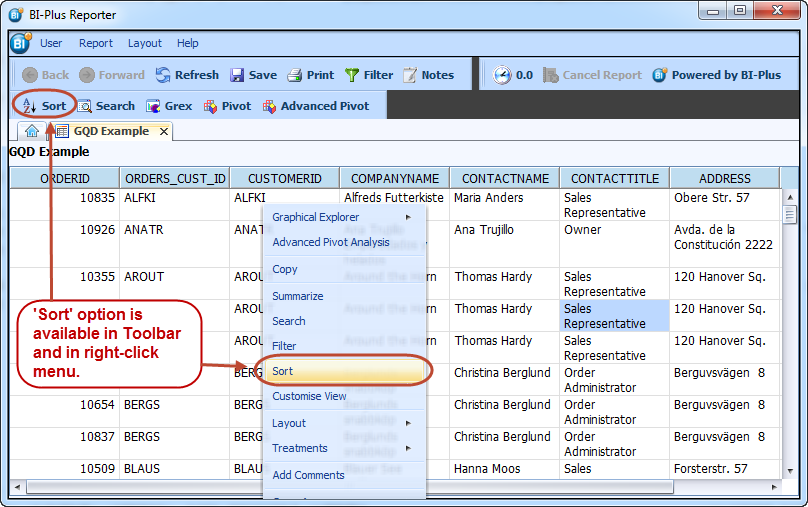 To sort the data into ascending of descending order within a column click on the column header and an up arrow will invoke an ascending sort and the down arrow will invoke a descending sort. For a more detailed sort within a report, right click in the report to invoke a sort dialog box. Click the add key to open the criteria sort by line and select the criteria to be sorted and nominate whether the criteria is to be sorted in ascending order or descending order.
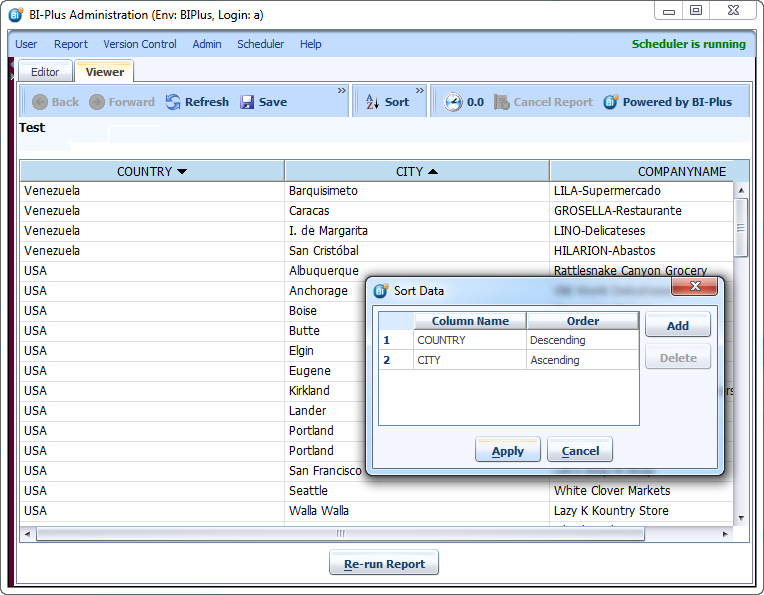
Following image is displaying the results after applying descending filter on COUNTRY column and ascending filter on CITY column.
To sort the data into ascending of descending order within a column click on the column header and an up arrow will invoke an ascending sort and the down arrow will invoke a descending sort. For a more detailed sort within a report, right click in the report to invoke a sort dialog box. Click the add key to open the criteria sort by line and select the criteria to be sorted and nominate whether the criteria is to be sorted in ascending order or descending order.
Following image is displaying the results after applying descending filter on COUNTRY column and ascending filter on CITY column.
 **Note**: Unlike Excel, where there is a limit of only 3 columns to be sorted at once with in the report, BIPLUS has no limits as to how many columns to sort on.