Repository Administration
Repository Administration has several important Configuration related features.
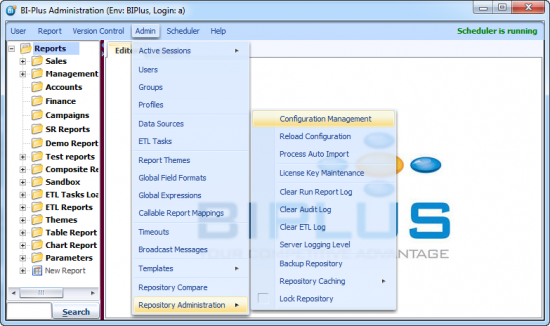
Lets examine each feature in detail.
- Configuration Management: See the topic Configuration Management for more details.
- Reload Configuration: If you have made any changes to biplus.xml file from server side the you need to reload those changes. (Note:Editing biplus.xml is not recommended.)
- Process Auto Import: If you have dropped any .SMD file for server side import at C:\BIPLUS\Apps\BIPLUS\import\current location, this feature enables you to force-start the import process.
- License Key Maintenance: Lets you to enter or update a BI-PLUS License key for your environment. See BIPLUS License Key for more details.
- Clear Run Report Log: BIPLUS Run Report Log is stored in the RPT_RUN_LOG table of Repository. Clearing this deletes all log information about reports run.
- Clear Audit Log: BIPLUS Audit log information is stored in the RPT_AUDIT_LOG table of Repository. Clearing this deletes all information.
- Clear ETL Log: BIPLUS ETL log information is stored in the RPT_ETL_LOG table of Repository. Clearing this deletes all information about ETL execution.
- Server logging Level: See Loggin Level in General tab.
- Backup Repository: Starts the Repository Backup, which includes Reports, Themes, Datsource, Users, ETL Tasks, Schedule Report, Groups, Profiles, Templates, Global Filed Format, Global Expressions and few more things. This backup is stored at “C:\BIPLUS\Apps\BIPLUS\backup\export\” location with the file name as backup date & time.
- Lock Repository: Lock the repository to prevent any changes to the BI-PLUS configuration. This is strictly an Administrative feature.