Timeout
BIPLUS has the ability to govern how long each query can run before it gets timed out. These limits are by Datasource, by user and time of day.
Only Administrators have the ability to maintain timeout values. Timeout maintenance is invoked by clicking the Timeouts option of the Admin ⇒ Timeout menu and the timeouts dialog appears as below.
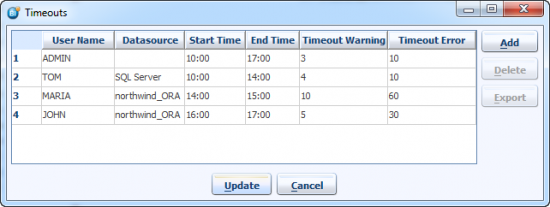
Each timeout entry has 2 limits (in seconds), a warning and an absolute timeout limit. The warning means that when a report is being run, if the number of seconds the report runs for, reaches the warning timeout limit, a message will appear to warn the user that the report is taking too long. This warning can be clicked through or ignored, but if the second elapsed time is reached, the query execution will be stopped in the database. The same thing happens if a user presses the stop button during a long-running query.
There is a generic timeout limit for ALL datasources (NULL Datasource selected means All) of 3 seconds warning and 10 seconds timeout error between the hours of 10:00 and 17:00.
For user TOM and for SQL Server datasources of 4 seconds warning and 10 seconds timeout between the hours of 10:00 and 14:00. And so on…
So when the Admin user runs a report and that report takes more than 3 seconds to execute then the Admin user will get a warning which says that Report is taking too long, Do you want to continue? See image below.
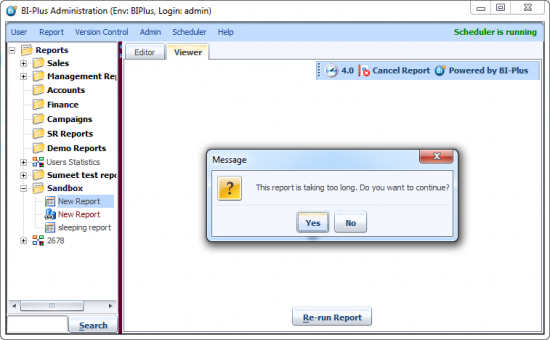
If you click ‘Yes’ to this prompt, it will continue to run until it hits the 2nd timeout, after which the thread in the target database is terminated, releasing all database resources used to process the query. When this happens, you will get a timeout error message.


